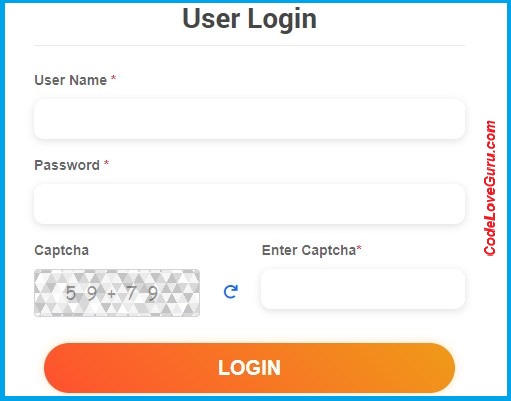
How to add Captcha in Laravel (लारवेल में कैप्चा कैसे जोड़ें)-
The full form of CAPTCHA is ‘Completely Automated Public Turing test to tell Computers and Humans Apart‘ (कैप्चा का पूर्ण रूप ‘कंप्यूटर एवं मानव कोअलग बताने के लिए पूर्णतः स्वचालित सार्वजनिक ट्यूरिंग परीक्षण’ है).
Captcha is the added/used in form for security reasons. You can say Captcha is used for security to stop brute force attack (कैप्चा सुरक्षा कारणों से जोड़ा/प्रयुक्त किया जाता है। आप कह सकते हैं कि कैप्चा का उपयोग सुरक्षा कारणों से ब्रूट फ़ोर्स हमले को रोकने के लिए किया जाता है).
Google provides free Captcha services for web applications (गूगल वेब अनुप्रयोगों के लिए निःशुल्क कैप्चा सेवाएँ प्रदान करता है).
- The are three main categories of Captcha code – text-based, image-based, and audio (कैप्चा कोड की तीन मुख्य श्रेणियां हैं – टेक्स्ट-आधारित, छवि-आधारित और ऑडियो).
Web Software Developers use custom Captcha code in web applications that is randomly generated set of characters and numbers with colored or patterned background (वेब सॉफ्टवेयर डेवलपर्स वेब अनुप्रयोगों में कस्टम कैप्चा कोड का उपयोग करते हैं जो रंगीन या पैटर्न वाली पृष्ठभूमि के साथ वर्णों एवं संख्याओं का यादृच्छिक रूप से उत्पन्न सेट होता है).
Example – Add Custom Captcha Code in user login form (उपयोगकर्ता लॉगिन फ़ॉर्म में कस्टम कैप्चा कोड जोड़ें)-
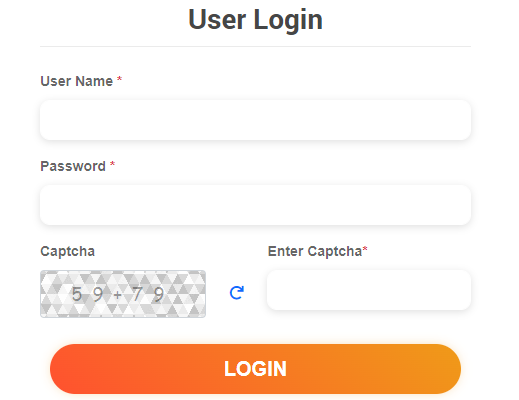
- Create login.blade.php file and add bellow code (login.blade.php फ़ाइल बनाएं तथा नीचे दिया गया कोड जोड़ें)-
<?php
@section('content')
            <div class="col">
                <div class="p-4 p-lg-5 login-form">
                  <div class="text-center text-md-center mb-4 mt-md-0">
                    <h3 class="mb-0">User Login</h3>
                  </div>
                  <form action="{{route('login')}}" method="post"  class="mt-4 needs-validation" novalidate>
                    @csrf
                    <div class="form-group mb-3">
                        <label for="user_id">User Name<span class="text-danger"> *</span></label>
                       <input type="text" class="form-control" maxlength="50"  name="user_id" id="user_id" required>
                   </div>
                    <div class="form-group mb-3">
                        <label for="password">Password <span class="text-danger"> *</span></label>
                        <input type="password" name="password" class="form-control" id="password" required>

                    </div>
                       <div class="form-group">
                        <div class="form-group">
                            <div class="row">
                                <div class="col-md-5">
                                    <div class="captcha">
                                        <label class="btn-block">Captcha</label>
                                        <span class="unselectable" id="p_refresh"></span>
                                        <input name="captchacode" type="hidden" class="form-control captchacode unselectable h4" value="" readonly>
                                    </div>
                                </div>
                                <div class="col-md-1"><br/><br/>
                                    <div class="refresh"><a href="javascript:void(0)" title="Refresh Captcha"><span class="fas fa-redo"></span></a></div>
                                </div>
                                <div class="col-md-6">
                                    <label>Enter Captcha<span class="text-danger">*</span></label>
                                    <input name="captcha" type="text"  maxlength="6" id="captcha-input" class="form-control" required>
                                </div>
                            </div>
                        </div>


                        <div class="clearfix"></div>
                    </div>

                    <div class="d-grid mb-3">
                        <button class="cstm-btn btn btn-lg" type="submit">Login</button></div>

                  </form>
                </div>
              </div>
  <script type="text/javascript">
     $(document).ready(function () {
        get_captcha();
   })
   $(".refresh").on("click", function () {
    get_captcha();
    });
    function get_captcha()
    {
        $.ajax({
            type: "GET",
            url:"{{url('get-captcha')}}",
            dataType: "json",
            success: function (res) {
                $("#p_refresh").html(res.Code1 +'+'+ res.Code2);
                $(".captchacode").val(res.Code1 + res.Code2);
            },
        });
    }
   </script>
   @endsection
?>
- Add bellow code in web.php for routes (मार्गों के लिए web.php में नीचे दिया गया कोड जोड़ें)-
<?php
Route::match(['GET','POST'],'login', [UserLoginController::class, 'login'])->name('login');
Route::get('get-captcha',[UserLoginController::class,'captcha'])->name('captcha');
?>- Create UserLogin.php Controller and add bellow code (UserLogin.php नियंत्रक बनाएं और नीचे दिया गया कोड जोड़ें)-
<?php
namespace App\Http\Controllers;
use Auth;
use Illuminate\Http\Request;

class UserLoginController extends Controller {
	public function login(Request $req){
        if($req->method()=='POST') {
            $req->validate([
                'username' => ['required'],
                'password' => ['required'],
                'captcha'=>['required'],
            ]);

           if($req->captchacode!=$req->captcha)
           return back()->with('error', 'Oops! Invalid Captcha Code!');

            if(Auth::guard('users')->attempt(['username' => $req->username, 'password' => $req->password])) {
               return redirect()->route('dashboard')->with('success','You have logged in successfully', );
            } else {
                return back()->with('error','Invalid Credentials!');
            }
        }
        return view('login');
    }
    public function captcha(){
        $Code1 = rand(11, 99);
        $Code2 = rand(11, 99);
        $capchaCode = $Code1 +  $Code2;
        session()->put('capchaCode', $capchaCode);
        $data['capchaCode']=$capchaCode;
        $data['Code1']=$Code1;
        $data['Code2']=$Code2;
        return response()->json($data);
    }
}
?>
Laravel Interview Questions and Answers…
How to add Captcha in Laravel?
Tags: Add Google reCAPTCHA to Laravel Forms, How to add Captcha in Laravel, How to Create Captcha Code in Laravel, How to Generate Captcha Code in Laravel